Forum Bug Thread

Please use this post for reporting forum bugs.

While we would like to hope that the code we write is solid as a rock and has zero flaws, we know that just isnt the case 100% of the time. While the forums continue to grow and we continue to add features and expand upon existing features, a bug here or there might pop up. Please use this post for reporting problems you are facing, or issues you notice with our new forums.

Rest assured, a Stardock rep will be monitoring this post and helping out as much as possible. With your help, we can make sure that the forums continue to run smoothly and without issue.

78,001 views 138 replies
Reply #1 Top
Opera 9.00


[1] Recent Posts > Last Post Info > I assume the little blue arrow is to take you to the last post in the thread..... it doesn't.


[2] Externally linked images are replaced by a tiny blue square.


[3] The Add A Reply 'toolbar' doesn't work. The buttons jump to the right on mouseover, but do nothing when clicked.

Reply #2 Top

1) assumption incorrect!

2) Dark-Star was supposed to have this fixed yesterday. I cannot reproduce locally, please try clearing cache.

3) Browser, Browser Version, Advanced or In-Post mode?

Reply #3 Top
Posting from opera, all buttons on the in-post mode editor work in Opera 9.

Bold
Italic
Underline
Reply #4 Top
[1] My mistake... sorry


[2] It is indeed fixed, I hadn't open a thread with images this morning.... sorry again.


[3]Browser is Opera 9 as stated in comment #1, in-post mode.


Posting from opera, all buttons on the in-post mode editor work in Opera 9.
They do nothing here, but obviously it's on my end, but what could be the cause, I wonder.....


Thanks guys.

Reply #5 Top
Unsure about the opera issue. I'll keep thinking about it and see if I can come up with something to test.
Reply #6 Top
Using Firefox...one post a comment is disappears...only way to view thread again is from my personal pages "activities"...
Reply #7 Top
I'm sorry, I don't understand you. Can you reply rephrase?
Reply #8 Top
when using the RSS feeds as a Live Bookmark in FF 1.5.0.5 (and previous versions) i get 'non-alpha' characters displayed incorrectly in thread titles :-

Reply #10 Top
Not really a bug, but probably more of 2 graphical issues:

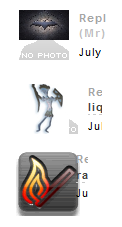
Avatars that are to small show the "No Photo" image. And one avatar I have noticed is rendered to large (I think? Maybe thats how its meant to be, but it overlaps text):


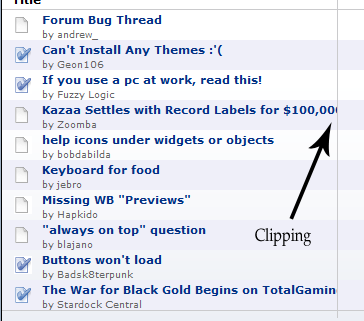
And clipping in the recent posts needs to be added (makes it look more professional, imho ):


(Oh, Firefox 1.5.0.5 is my browser >_>)
Reply #11 Top

The clipping how it is shown in your screenshot is exactly how it's supposed to behave. Thanks though

We're aware of the avatar issue with the background image. It's just not a high priority fix at the moment.

Reply #12 Top
Koasati, Upgrade to 9.01. I've been seeing the pics now for a couple days. It also addressed some issues with Shockwave and it's pretty stable so far.
Reply #13 Top
OK I got a good one for you guys.
I clicked on a header called "Can't Install Any Themes" by Geon106 and what I got is in the pic below. You'll notice the header & main post is from a different item, yet the post content is correct for the header I clicked on. When I checked back to "Recent Posts" the top one was the same as the one in the pic. I actually noticed this twice yesterday (Friday) but was unable to get a screenshot. I'm running Opera 9.01

Reply #14 Top
Man it gets weirder and weirder.

I was just in the thread by Hermdog called "Sorting Folders In Tabbed Dock"
I wrote a response and hit "Post Comment" and when it redrew I was in a post by Hannes22 called "Object Dock and DVD Fullscreen Problems" and there was my comment posted in it. The thread was last posted to on Dec 24, 2005 and I hadn't opened it since before then. Opera 9.01 build 8552. I'm gonna have to grab another beer to enjoy this kinda thing.......
Reply #15 Top
Have you seen the same behavior with other browsers?
Reply #16 Top
Have you seen the same behavior with other browsers?


No, I don't use other browsers very often.

I believe Jafo reported the same thing in an earlier thread. Seems to me he said he was using IE7

Reply #17 Top
I've seen this reported a few times, but we've been unable to reproduce the problem. Best thing I can do at this point is to just keep an eye out.
Reply #18 Top
In Firefox 1.5.0.5, if you type text in the in-post reply box, then click on Advanced Mode, the text you have doesnt carry over into the editor. In IE6 it does, so I think this is a bug.
Reply #19 Top
CerebroJD - that has been resolved. Thanks.

Reply #20 Top
While this is not a forum issue - not sure where else to put it.

All week when I log in I get taken to a blank page that has nothing on it but the recent pole question in the center of this blank page. I have to hit the back button and log in my user name again. This happens everytime I log in - I have to do it twice .
Reply #21 Top

I keep getting this:

Server Application Unavailable

The web application you are attempting to access on this web server is currently unavailable.  Please hit the "Refresh" button in your web browser to retry your request.

Administrator Note: An error message detailing the cause of this specific request failure can be found in the application event log of the web server. Please review this log entry to discover what caused this error to occur.

Reply #22 Top

Fairry, you probably want to post that issue as a new post and not under the *Forum Bug Thread*. The forums run a completely different codebase from the rest of the wincustomize website.

Fuzzy, when you say 'I keep getting...' how often does that mean? We were doing several updates during the day yesterday...

Reply #23 Top
Several times a day for the last week   
Reply #25 Top
Andrew,

If I go into Internet Options and clear cookies, files (online and offline), and history for IE6.0.2900.2180 and then attempt to log back on to WinCustomize - I receive the same page displayed in the image in comment #21 here:

[link=https://forums.wincustomize.com/?forumid=188&aid=124902&p=1]WWW Link">Link

Issue #2 would be that the "link" button function does not seem to work consistently in the same browser.