Issue with Back - Forward and Down Arrows in Explorer (FIXED)

Been going on for years...

This problem has existed for years, and I would have thought someone at Stardock would have caught it by now, but I guess not.  After applying a skin, any skin, the back-forward-down arrows in explorer are fine when you open an explorer window. But if you apply the skin again, like when designing in SKS, the issue occurs. See image below.
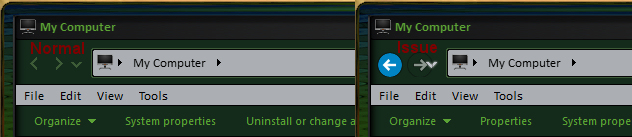
Win 10 Issue

Hope this can be fixed, it gets really irritating after awhile. :-(

14,600 views 11 replies
Reply #1 Top

Hello,

I have forwarded your report to the Stardock support team for their review and recommendations.

Please keep an eye on this thread for any updates.

We really do appreciate your feedback, thanks.


AzDude
Stardock Community Assistant

Reply #2 Top


Hope this can be fixed, it gets really irritating after awhile.
I second that. Happens randomly when not using SKS or changing skins too at my computer.

Reply #3 Top

Hello,
Sorry to hear you are having issues. But, I can't reproduce it on both my Window 10 systems. Any specific steps that I need to do to reproduce it?

Thanks

Basj,
Stardock Community Assistant.

Reply #4 Top

I third the motion, I get it all the time When I ran Win 8.1, and Win 10, it happens mostly if I have a window open, for any length of time, I don't have to reload a skin (but it does happen on reloading too), just keep my Explorer window open long enough, and it'll change the arrow buttons to the default (I guess) from the skinned arrow.  I'm usually opening files/folders, and then it will eventually change. I'm glad I'm not the only one getting this, cause at first, I thought it was just  me. :|  

Reply #5 Top

Hello,

Thanks for the input, but is this has something to do with "OldNewExplorer"? Since I recognize from Tom's screenshot the explorer look a bit different than mine.

Thank you,

Basj
Stardock Community Assistant.

Reply #6 Top

Quoting basj, reply 5

Hello,

Thanks for the input, but is this has something to do with "OldNewExplorer"? Since I recognize from Tom's screenshot the explorer look a bit different than mine.

Thank you,

Basj
Stardock Community Assistant.


Hmmmmm, I will check that out, thanks! :-)

Reply #7 Top

That was it! I Uninstalled Old New Explorer, rebooted, the opened Old New Explorer and unchecked the box for "Use alternate navigation buttons style", Installed Old New Explorer again and all is fine. :-) Thanks basj! :-)

Reply #8 Top

Great, Glad it work out.

Thank you,

Basj
Stardock Community Assistant.

Reply #9 Top

Thanks Basj! |-)  

Reply #10 Top

Welcome Don.

Thank you,

Basj
Stardock Community Assistant.