I'm confused: what are you offering exactly

this active use, subscription, grouped products, beta purchase, and upgrades options are confusing me

My situation: I purchased individual licences before here, and they are all working find, I can manage them and it optimises my use of my PC neatly; alright.

So now, I want to purchase more products from you, and for price, I am considring buying the OD suite...but:

I saw this subscription feature listed in on the page and I'm worried that buying OD implies renting licenses that will expire after one year / charge full price every year.

I just want to buy lifelong licenses for 1 active use at a time and intend to stop my subscription right after paying. I don't mind if a product get a bit out of shape on later OS as long as I can still uninstall / reinstall it. 

So I searched the FAQ and the forum a bit, and found this: 
https://forums.stardock.com/520602/installingactivating-an-expired-license 
and it only made me worry more, without clarifying how it works. 

->So, are we offered to purchase licenses, or to rent them yearly with OD?
Can I just have the lifelong licenses, and not the subscription?

->If I purchase a product in beta, does it means that I will have the final version free, or will I have to upgrade, and for how much %?

-> Why does OD contains old versions of only some products in addition to the new ones, what use it to have old version beside of the extra licenses?


37,495 views 24 replies
Reply #1 Top

Object Desktop is a Subscription service which has an annual renewal fee.

For as long as you keep subscribing every included application can be downloaded... used..and updated.

If or when you cease subscribing any applications you have downloaded can still be installed and used, but after you cease subscribing you no longer have access to updates.

What you obtain during you subscription period remains yours to use forever.

Reply #2 Top

Applications can be bought and downloaded individually, no different to any other form of online purchase.

Updates are only available for the term of the version release.  As and when a new full version update is released you will need to purchase again (often at a lower update price).

If you intend to use several applications over generations of Windows version releases then Object Desktop's subscription system is far more economical.

Reply #3 Top

Two questions/details more then:

- Is it all updates that will stop or just major ones: if I have Start 11, will I get 11.X updates, or none at all?

- How likely is it that the bugs will end up making the product unusable overtime on the same OS?
Am looking for feedback from personal use.

Reply #4 Top


I want to buy lifelong licenses for 1 active use at a time;
I intend to stop my subscription right after paying;
I don't mind if a product get a bit out of shape on later OS as long as I can still uninstall/reinstall it.

Some product have one active install, some for example Groupy 2 have 5 active installed. The product you purchase is lifelong licenses. Once you purchased a license for example, if you purchase Groupy 2 now, you will get a key which should activate all Groupy 2 release, which include all betas, and all V2.X release in the future.


-> Are we offered to purchase licenses, or to rent products yearly
Will a product forcibly cease to work when my subscription is stopped?

If you purchase product via Object Desktop package. It is subscription base, but the product will continue to work beyond your subscription expiry date. It just that once it expired, you no longer have excess to download your installer from your account.


-> What does 5 active uses per product means:
does product activation works OEM, tying itself to the mother board, unable to work on another?
or does it means that I get 5 licenses that I can unregister/reinstall/recycle at will, lifelong, when I replace my PC with a new one?

-> If I can reuse my licenses,
how will a product know when it's active or not, once my old PC is offline and dead?

5 active install mean you can activate and use that product on 5 different system at any one time. note : 5 systems include physical and virtual systems. You can deactivate old activation and reactivate on new system. : https://forums.stardock.com/486311/accounts-and-activation-support-faq#deactivateproduct.


->If I purchase a product in beta,
does it means that I will have the final version free, or will I have to upgrade, and for how much %?

No, if you purchase a product in beta stage, you will be able to activate the full release version with the same key.


(bonus question, don't mind it if you feel overwhelmed: Object Desktop offers old versions of products in addition to new ones: could we renounce the old ones and have a lower price instead?)

Object Desktop don't offer old version installer. Once a product release newer version, the older version link will be removed from your account.

Thank you,

Basj,
Stardock Community Assistant

Reply #5 Top

Applications' licences are never 'annual', but by definition  a 'Subscription Service' is annual.

When you have downloaded an application along with its serial they are yours to use forever.

If however you Update your operating system there can be no guarantee the application will still work as it may no longer be compatible.

Reply #6 Top

It's just that once your subscription expired, you no longer have excess to download your installer from your account.

But if I haven't saved the download and license,
can I still install it from its public page,
and find the license in my account like with individual purchases?
Or do I have to save both out of my Stardock account.

Object Desktop don't offer old version installer.

On https://www.stardock.com/products/odnt
both Start 10/Start 8 and Start11 are listed. Groupy and Groupy 2 as well.
Are those not different versions of the same product?

Reply #7 Top

During the period of a Subscription any installers remain available as they are updated.

However, you MUST download any installers you wish to continue to use in future as the end of the subscription means the end of access to them.

Reply #8 Top

No, if you purchase a product in beta stage, you will be able to activate the full release version with the same key.

- Even if I got the production through OD, and when the full release comes out, I'm no longer subscribed?


To be precise: when I buy OD and my subscription is stoped and expired, on https://store.stardock.com/myaccount/products

I still will have the rectangle of the OD products,
theit Vew Product Keys link will still active and show a usable key,
but their Download button will be disabled.
- Did I get it right?

- In addition to Object Desktop, does each individual product that mentions this subscription feature works that way?

Reply #9 Top

Quoting shalyriam, reply 8

- Even if the full release comes out when I'm no longer subscribed I will be able to activate it with my key?

How can you activate a full released product when you can not download the full release version installer when your subs expired?

Quoting shalyriam, reply 8

- Did I get it right?

Yes, no excess to download area when subs expired.


Quoting shalyriam, reply 8

- In addition to Object Desktop, does each individual product that mentions this subscription feature works that way?

No, individual product purchase don't work like Object Desktop. You will always have your purchased product download link in your account.

Thank you,

Basj,
Stardock Community Assistant

Reply #10 Top

Yes, no excess to download area when subs expired.

...
Based on my screenshot:

A. the products rectangles just don't shop up at all anymore:
neither Icon, Name, "Vew your license key", nor "Download".

B. the product rectangles shows up (Icon, Name, "Vew your license key")
and only the "Download" buttons is absent or disabled.

(Just A or B, please. English grammar is tricky to me. I'm trying to be very specific.)

Reply #11 Top

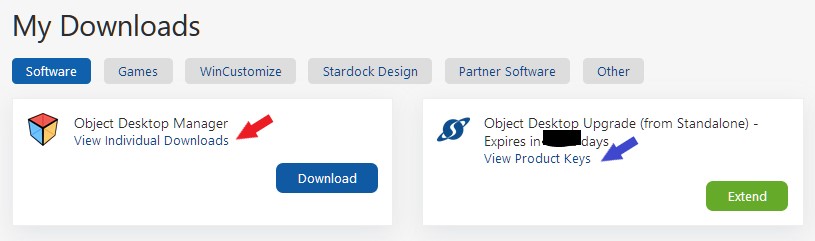
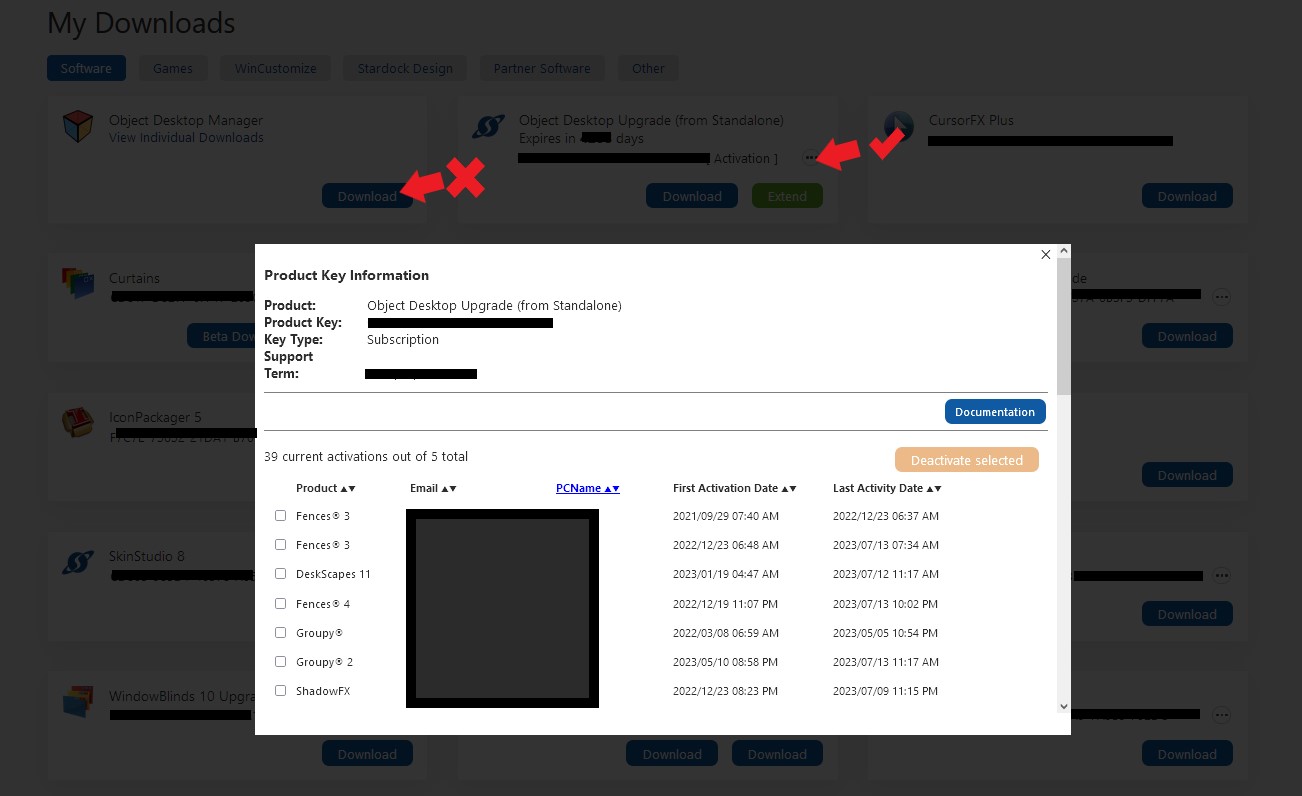
If you purchase Object desktop you will get something like screenshot below. And if your subscription expired. The red arrow link will be disable but the blue arrow link should still work for your product key and managing activation.

Thank you,

Basj,
Stardock Community Assistant

+1 Loading…
Reply #12 Top

Also be advised that after your subscription expires, they won't allow you to download any more content ,such as skins, from the site. Even if you purchase software and own a license they will shut down your ability to download any content until you pay for another SUBSCRIPTION to something. Trust me , I learned the hard way, despite the fact that I was a content creator, I was shown the door more or less.

-- Ace --

+1 Loading…
Reply #13 Top

Quoting AceMatrix, reply 12

they won't allow you to download any more content ,such as skins

SD Admins - Is this truly the case?

Reply #14 Top

Ace, I think you're misremembering the sub thing. It showed you as a past customer: Your ODNT sub had run out several months before, your WC sub more than a year before, if memory serves me. To enjoy unlimited downloads, you have to have an software sub or an active WC sub.

I went to bat for you @SD and Jafo looked up the sub thing. He also promoted you, as we'd overlooked you. Nos maxima culpa.

Let's be fair: WC and SD weren't ever advertised as, nor meant to be considered anyone's free cloud storage.

Content creators: Your contributions are valued. I'd advise keeping a couple of backups of them, off your rig.

Reply #15 Top

Quoting Jafo, reply 7

During the period of a Subscription any installers remain available as they are updated.

However, you MUST download any installers you wish to continue to use in future as the end of the subscription means the end of access to them.

Quoting basj, reply 4
If you purchase product via Object Desktop package. It is subscription base, but the product will continue to work beyond your subscription expiry date. It just that once it expired, you no longer have excess to download your installer from your account.

Quoting Jafo, reply 1

Object Desktop is a Subscription service which has an annual renewal fee.

For as long as you keep subscribing every included application can be downloaded... used..and updated.

If or when you cease subscribing any applications you have downloaded can still be installed and used, but after you cease subscribing you no longer have access to updates.

What you obtain during you subscription period remains yours to use forever.

Just want confirmation I am reading this thread and the Object Desktop Support FAQ thread correctly, since apparently there was a recent change to Object Desktop back in June 2023.

Purchased Object Desktop back in 2019.  It has never been renewed since that time.  I have all the downloads from that original purchase and the serials associated with those downloads.

Relevant portions quoted above.

If one were to renew the 2019 purchase using the current subscription model of Object Desktop, and did not renew the new subscription after the 1 year period, then after the subscription officially expired:

  1. Would any of the current installers downloaded within the 1 year subscription period still be able to be installed and activated properly, after the subscription has lapsed?
  2. Can one still perform product deactivations (in an effort to install on a different machine) and new activations using the current downloaded installers, after the subscription has lapsed?
  3. Could one use the 2019 downloaded installers and those original serials if one wished to revert to a previous version of any of the products in Object Desktop? 

Many thanks in advanced for answers to these specific questions.

Reply #16 Top

Quoting mclab, reply 15

Just want confirmation I am reading this thread and the Object Desktop Support FAQ thread correctly, since apparently there was a recent change to Object Desktop back in June 2023.

Purchased Object Desktop back in 2019.  It has never been renewed since that time.  I have all the downloads from that original purchase and the serials associated with those downloads.

Relevant portions quoted above.

If one were to renew the 2019 purchase using the current subscription model of Object Desktop, and did not renew the new subscription after the 1 year period, then after the subscription officially expired:

  1. Would any of the current installers downloaded within the 1 year subscription period still be able to be installed and activated properly, after the subscription has lapsed?
  2. Can one still perform product deactivations (in an effort to install on a different machine) and new activations using the current downloaded installers, after the subscription has lapsed?
  3. Could one use the 2019 downloaded installers and those original serials if one wished to revert to a previous version of any of the products in Object Desktop?

Many thanks in advanced for answers to these specific questions.

I'll try to answer it.

  1. Yes, you should be able to activate it even your subscription expired. Should just work like non subscription base product.
  2. Yes, you should still be able to do activation management.
  3. Yes, that should still work.

Thank you,

Basj,
Stardock Community Assistant


Reply #17 Top
  1. One still perform product deactivations (in an effort to install on a different machine) and new activations using the current downloaded installers, after the subscription has lapsed. Able to activate it even your subscription expired. Should just work like non subscription base product.
  2. Yes, you should still be able to do activation management.
  1. ...As long as you have downloaded the OD installer file, every skin you ever wanted from the W library, have noted the OD activation code offline, and plan to use those only.
    (From what I now understand, after putting the pieces together in dozens of back anf forth. I'm precising this because again, this time, the answer given isn't complete and might leavt you guessing like I was.)
  2. That sounds great. Yet, unless there are offline tools to deregister products, this contradict an earlier answer I personally got that seemed to  says the OD product completely diseapper from the dashboard, including managment, when we stop the subscription and it expires. Am confused again.

(I don't mean to antagonize the Stardock team, as I respect and like their products, and well, they do answer. But there really is room for improvements or courses for new employees regarding clarity and precision in the deparment of communication with customers. This isn't about me. These informations should already be on the product page.)

Reply #18 Top

Quoting shalyriam, reply 17

That sounds great. Yet, unless there are offline tools to deregister products, this contradict an earlier answer I personally got that seemed to says the OD product completely diseapper from the dashboard, including managment, when we stop the subscription and it expires. Am confused again.

I believe if your subscription expired you will not have the download section but the management part still there. As I never had my OD sub expired yet. I am not 100% sure. So, to confirm it, I have forwarded your problem/question to Stardock Support Team for their assistance. Please keep an eye on this thread for any updates. We appreciate your feedback and patience.

Basj,
Stardock Community Assistant

Reply #19 Top

I can confirm it. You can still manage activations even after your OD sub has expired. My partners sub is expired. I was trying to install Groupy 2 on her machine to test with and realized we need to renew it. However it still let her go into activations. 

+1 Loading…
Reply #20 Top

Quoting basj, reply 16

1. Yes, you should be able to activate it even your subscription expired. Should just work like non subscription base product.

2. Yes, you should still be able to do activation management.

3. Yes, that should still work.

Many thanks for the point by point reply.

Does this reply constitute official Stardock policy?  Only asking as the "Stardock Community Assistant" may not be an official Stardock employee.

Quoting basj, reply 18

So, to confirm it, I have forwarded your problem/question to Stardock Support Team for their assistance. Please keep an eye on this thread for any updates. We appreciate your feedback and patience.

I would be interested in this update as well.  I confess I had a strong reaction to the lack of ability to open a ticket directly with Stardock for some of these questions, and was instead directed to the forum.  It was... not a positive reaction.

Quoting Narusegawa, reply 19

I can confirm it. You can still manage activations even after your OD sub has expired. My partners sub is expired. I was trying to install Groupy 2 on her machine to test with and realized we need to renew it. However it still let her go into activations. 

Thank you very much for posting your personal experience! 

Reply #21 Top

Quoting mclab, reply 20

I would be interested in this update as well. I confess I had a strong reaction to the lack of ability to open a ticket directly with Stardock for some of these questions, and was instead directed to the forum. It was... not a positive reaction

Hello,
Sorry to hear you are having issues. Please raise support ticket using the link below, use the "Ask a Question" option. Include all information details. Remember to record down the ticket number for future reference if needed. Do not raise multiple ticket, that will make your ticket back to the end of the line. Send once and wait. Ticket will be answer by the order they send in.


https://stardock.atlassian.net/servicedesk/customer/portal/4/group/14

Thanks
Basj,
Stardock Community Assistant

Reply #22 Top

Quoting mclab, reply 20

Does this reply constitute official Stardock policy?  Only asking as the "Stardock Community Assistant" may not be an official Stardock employee.

Yes, it does....;)


Reply #23 Top

Quoting basj, reply 21

Hello,
Sorry to hear you are having issues. Please raise support ticket using the link below, use the "Ask a Question" option. Include all information details. Remember to record down the ticket number for future reference if needed. Do not raise multiple ticket, that will make your ticket back to the end of the line. Send once and wait. Ticket will be answer by the order they send in.

https://stardock.atlassian.net/servicedesk/customer/portal/4/group/14

Thanks
Basj,
Stardock Community Assistant

Thank you for providing this advice and the URL.  Ticket submitted. 

Quoting Jafo, reply 22

Yes, it does....;)

And thank you for confirming this as well!

+1 Loading…
Reply #24 Top

Quoting mclab, reply 20

Only asking as the "Stardock Community Assistant" may not be an official Stardock employee.

There's a Stardock badge next to his avatar...just as there is for Jafo.