I do database development using a database called 4th Dimension. Because I support multiple projects of different ages I need to keep multiple versions of 4D on my computer.
Unfortunately, Start 11 v2.56 is getting very confused by these multiple versions, mixing up names and icons. And there does not seem to be any way to see and edit the paths to the actual applications. (As in Properties.) Here is an example:

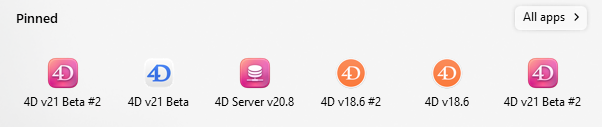
The orange icons are from version 18.x. The pink is for version 20.x. The white is for version 21.x. As you can see, the version 20 and 21 icons are mixed up.
The icon on the far right is one I just added for version 20.8. As you can see, the name that was automatically given to it was the same as the one on the far left.
Before I added that pinned version, both the two leftmost icons were properly the white icons.
The newly added icon launches the correct version. But now the one on the far left is launching the same application copy instead of the version 21 copy it's supposed to launch.
I had not had any problems with this until about 2 weeks ago. (I was using Start 10 until about 2 months ago.)
Each version is in its own folder:
\Program Files\
4D\
4D v18\
4D\4D.exe
4D #2\4D.exe
4D Server\4D Server.exe
4D v20\
4D\4D.exe
4D #2\4D.exe
4D Server\4D Server.exe
4D v21 Beta\
4D\4D.exe
4D #2\4D.exe
4D Server\4D Server.exe
This is really a problem. I hope this can get fixed in the next update!
