sdRohan sdRohan

Fences 6.44 Release Feedback

Fences 6.44 Release Feedback

With the Fences 6.44 release today, we are creating this thread so that users can report any observed issues.  

Obtaining the product

Object Desktop members can get the release from within Object Desktop Manager 

Individual purchases (as well as Object Desktop Members) can also be obtained from your account page: https://store.stardock.com/myaccount/products

For guest check-out purchase (no account), from this link: http://www.stardock.com/support/productkeyretrieval

Reporting an issue

Please include the following for anything found:

  • Exact Windows version \ build (winver.exe)

  • Detailed steps to recreate the issue seen

  • Screenshots and videos are very helpful.  Videos can be uploaded to a cloud drive service (GoogleDrive, DropBox, OneDrive, YouTube), with a shared link included in your post.  Images can be copied and pasted directly into a post.

  • If there are specific apps that the app does not work (well) with, please note what apps and their exact versions.  If any app is not common, a link to a trial version would be appreciated.

4,455 views 60 replies
Reply #26 Top

Waiting for a solution, at this moment the only things working is a last setup of fences, the purge destroyed all my setting, nothing more

Reply #27 Top

Hi BigPond, 

Could you send me a message with your Backups folder attached? It would be here:

  • C:\Users\*USERNAME\AppData\Roaming\Stardock\Fences

This could be helpful for us to investigate further.

Thanks much,

Adam McGuinness 
Stardock Support Specialist

Reply #28 Top

Quoting BigPond, reply 18

No, it doesn't load to the last layout. The screen gets black and then the error message in #5 appears

Ok, that means you are getting this error, yes?

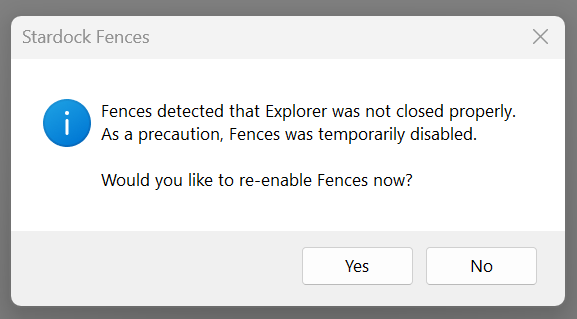
Ok, in all of our testing, that error has never been seen nor do we have widespread reports.  With that, we have to focus on what is special about the ones having the issue.

The best place to start is a 'Clean Boot', it eliminates (as best it can) all non-Windows services - along with instructions on how to enable our own (the one in question here is Fences).  This is the link for that:

https://support.stardock.com/space/SHC/1332445272/Fences+Clean+Boot

If you have Windows 10 Pro or Windows 11 Pro, another convenient option instead of the Clean Boot method is Windows Sandbox.  Our guide here includes instructions for doing this instead:

https://support.stardock.com/space/SHC/1416560645/Testing+Fences+in+Sandbox

If 6.44 loads under a new Windows account (as instructed to create) and with only Windows \ Fences enabled, we know its not the product itself. 

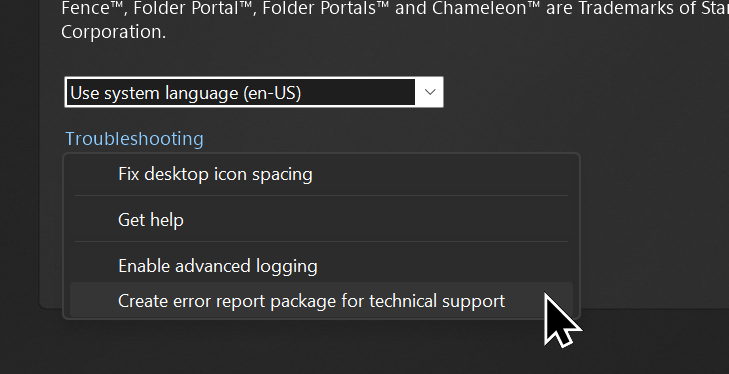
Should this fail still, I want you to 'Create error report package.... in Fences

Lastly, what OS version are you using and the build number?

Sean Drohan
Product Lifecycle Manager


Reply #29 Top

Quoting BigPond, reply 25

Unfortunately it's not working. The provided files in the zip change nothing. The error reappears and i cannot restore a backup.

I've had a chance to try with the Backups folder you sent me.  After replacing it with my own in 6.44, I can restore your latest layout just fine.  I do not get any error.  I suggest you refer back to sdRohan's Reply #28 to help isolate what may be different on your end.

Best regards,

Adam McGuinness
Stardock Support Specialist

Reply #30 Top

I am having the same error. I can load a saved layout, and it stays on the screen for a time, then the error box reappears telling me to re-enable Fences. I have my DLL's are correct and I have tried everything but the purge.

Reply #31 Top

Quoting luckydawg700, reply 30

I am having the same error. I can load a saved layout, and it stays on the screen for a time, then the error box reappears telling me to re-enable Fences. I have my DLL's are correct and I have tried everything but the purge.

Have you been able to try any of this in my prior post?

https://forums.stardock.com/541311/get;3991463

Sean Drohan
Product Lifecycle Manager

Reply #32 Top

Iโ€™d like to suggest a feature that I believe would significantly improve the organizational power of Fences for many users. Let me start with a real-world scenario to illustrate the need.

๐ŸŽฎ The Use Case: A Gamerโ€™s Desktop Dashboard

Iโ€™m a gamer. When I sit down at my PC, I want to see all my games in one single place. I donโ€™t want to hunt through separate fences labeled "Steam," "Epic," "Battle.net," "Xbox Game Pass," and "Emulators" โ€” that creates unnecessary visual clutter. My ideal setup is one fence called "๐ŸŽฎ GAMES" that I can expand to see everything I can play right now.

However, inside that single fence, I still desperately need logical separation. I need to distinguish at a glance between:

  • Steam games vs. Game Pass titles (different update/launcher behaviors).

  • Online Multiplayer games vs. Single-player campaigns.

  • VR-only titles that require me to put on a headset before launching.

๐Ÿšซ The Current Workaround and Its Pain Point

Right now, the only way to simulate this visual separation is by creating dummy shortcuts with blank icons and long dash names, e.g., โ€”โ€”โ€”โ€”โ€” STEAM โ€”โ€”โ€”โ€”โ€”. This looks somewhat acceptable until I right-click the fence and select "Sort by Name" or "Sort by Type" โ€” which I do frequently to keep newly installed games organized.

When sorting occurs, those fake "divider" shortcuts get treated as regular icons. Suddenly, my โ€”โ€”โ€”โ€”โ€” STEAM โ€”โ€”โ€”โ€”โ€” divider is sitting alphabetically between "Cyberpunk 2077" and "Dark Souls." The visual grouping is completely destroyed. I'm forced to choose between automated organization and manual visual structure โ€” a choice I believe Fences should help me avoid.

โœจ Proposed Feature: Native "Insert Separator"

I would love to see a native option added to the right-click context menu inside a fence: "Insert Separator" (or "Add Divider Line" ).

This separator would function as follows:

  1. Visual Only: It would appear as a thin horizontal line or a bold section header โ€” purely a visual boundary. It should be non-clickable and non-selectable (not treated as a file or shortcut).

  2. Immune to Sorting: The separator must stay locked in its position regardless of which sorting method is applied to the fence (Name, Type, Date Modified, etc.).

  3. Roll-Up Integration: When the entire fence is rolled up (collapsed), the separator should hide along with all icons. When expanded, it should reappear exactly where it was, preserving the internal layout.

Why This Matters

This feature would bridge a critical gap between Fences' excellent macro-organization (separate fences) and the need for micro-organization (sections within a single fence). It would transform a Fence from a simple container into a true desktop dashboard โ€” allowing users to see everything at a glance while maintaining a clean, structured internal layout.

Reply #33 Top

Hello, sorry iยดm late.

Just for Information i dont use  StartAllBack. It was/is not installed.

regards 

Guido 

Reply #34 Top

I've done now a clean boot => no success, same error.

I created a new admin user => same error.

I have a AMD graphics card , deinstalled with DDU in Safe Mode => same error.

I'm using Windows 11 pro 25H2 26200.8246.

I will send you a error report.

I'll stick with 6.20 for now.

Reply #35 Top

Yesโ€ฆI tried it all. I installed the previous version and now all is well, and will not be upgrading until this is fixed. 

Reply #36 Top

Quoting BigPond, reply 25

Unfortunately it's not working. The provided files in the zip change nothing. The error reappears and i cannot restore a backup.

Please see

https://forums.stardock.com/541311/get;3991322

Sean Drohan
Product Lifecycle Manager

Reply #37 Top

Quoting BigPond, reply 34

I'm using Windows 11 pro 25H2 26200.8246.

That would mean you have access to Windows Sandbox,. Can install a prior version in a Sandbox, create a saved layout, move icons \ folders on the desktop, install 6.44, restore that layout and it will work.  Ill bet my next paycheck on it....

Sean Drohan
Product Lifecycle Manager

Reply #38 Top

The 6.44.1 version doesn't change anything. The same error occurs.

I have uploaded a crash report (from 6.44.1) and got the info that a team member was informed about the upload.

Reply #39 Top

Quoting sdRohan, reply 37
That would mean you have access to Windows Sandbox,. Can install a prior version in a Sandbox, create a saved layout, move icons \ folders on the desktop, install 6.44, restore that layout and it will work.  Ill bet my next paycheck on it....

Yes, that's right, this way it works - but not in my regular system.

Reply #40 Top

Quoting BigPond, reply 39


Quoting sdRohan,
That would mean you have access to Windows Sandbox,. Can install a prior version in a Sandbox, create a saved layout, move icons \ folders on the desktop, install 6.44, restore that layout and it will work.  Ill bet my next paycheck on it....


Yes, that's right, this way it works - but not in my regular system.

As expected, ty for making the effort to show it works - just not for a very select few.  We have to figure out why you few are different.

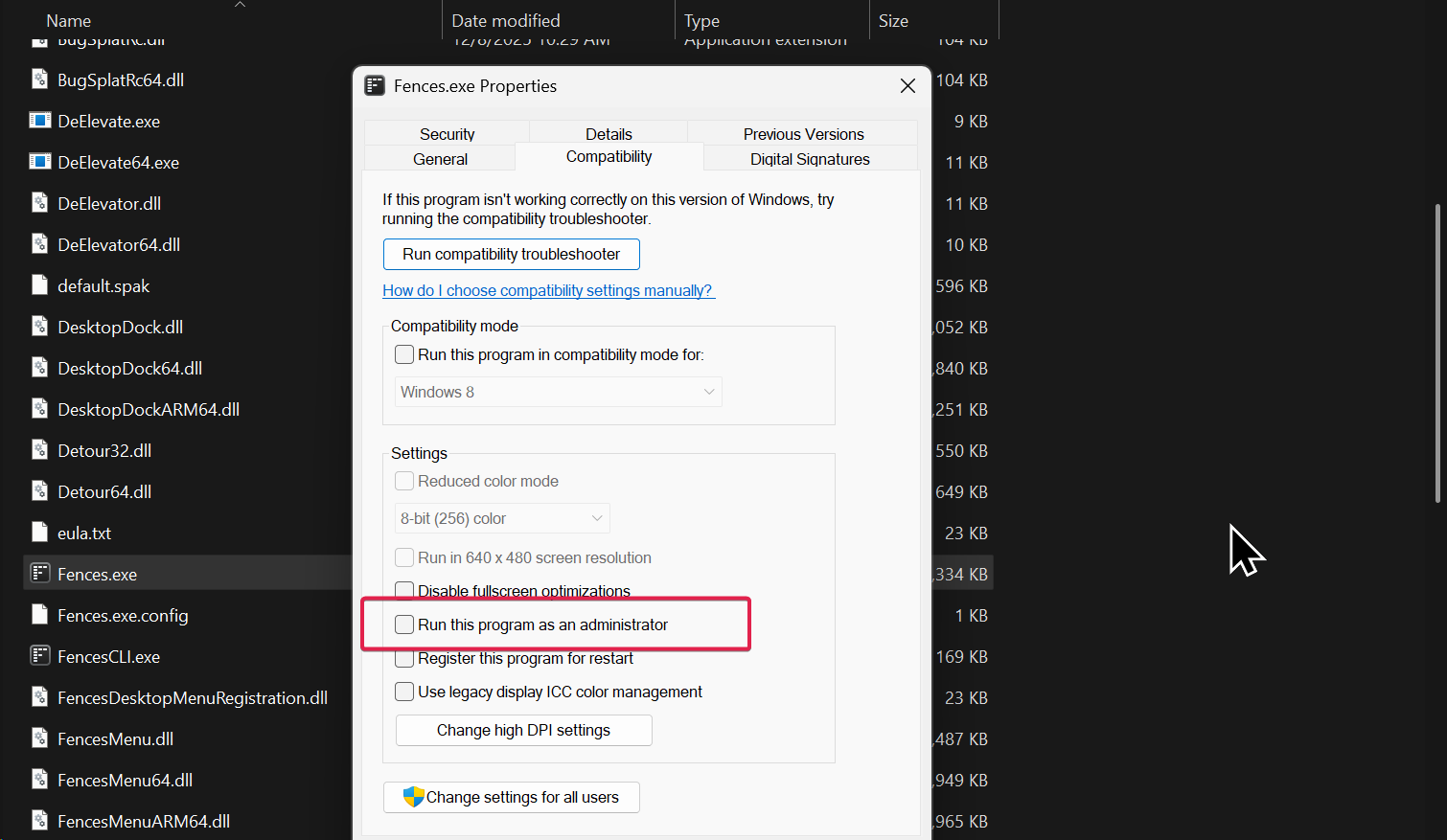
You are not running Fences.exe as admin, correct (you don't want that checked)?

Sean Drohan
Product Lifecycle Manager

Reply #41 Top

>You are not running Fences.exe as admin, correct (you don't want that checked)?

No. I tried it one time but it made no difference. I also tried to install the program as admin, but that didn't help either.

Reply #42 Top

Hello,

the previous version ran all perfect, now with this new fences last update it many times reboot explorer.exe 3, 4, 5,... times and some times is so much that fences not reestablish and i need to right click and re enable it. Sometimes it happens after restart of pc or sometimes while using it or do an alt-tab from a game. I have 2 screens and win10pro.

Thanks

Reply #44 Top

Same issues here with 6.4.4.1. I have tried all the changes on this thread and have also completely removed fences with "Revo Uninstaller" and reinstalled 6.4.4.1 which helped for a while after I went through the "enable fences" pop up routine on the desktop several times but it eventually just craps out again. I didn't have any problems with the original version 6. 

I have 2 monitors and fences on both monitors with 2 desktop screens per monitor which hasn't been an issue with fences for many years on several different computers. 

Reply #46 Top

Quoting WTFNickname, reply 45

I have two monitors. Could that be the shared condition across these cases?

No, i have just one monitor.

Reply #47 Top

Hi all, thanks for these reports.

We're looking into a crash issue with 6.44. So far, the issue hasn't shown in the reports, but we've added some additional crash-dump catching. (Fences lives inside of Explorer, so it can be difficult to be able to log all crashed, but the new logic will help.)

For those experiencing this issue, we're hoping you could do the following.

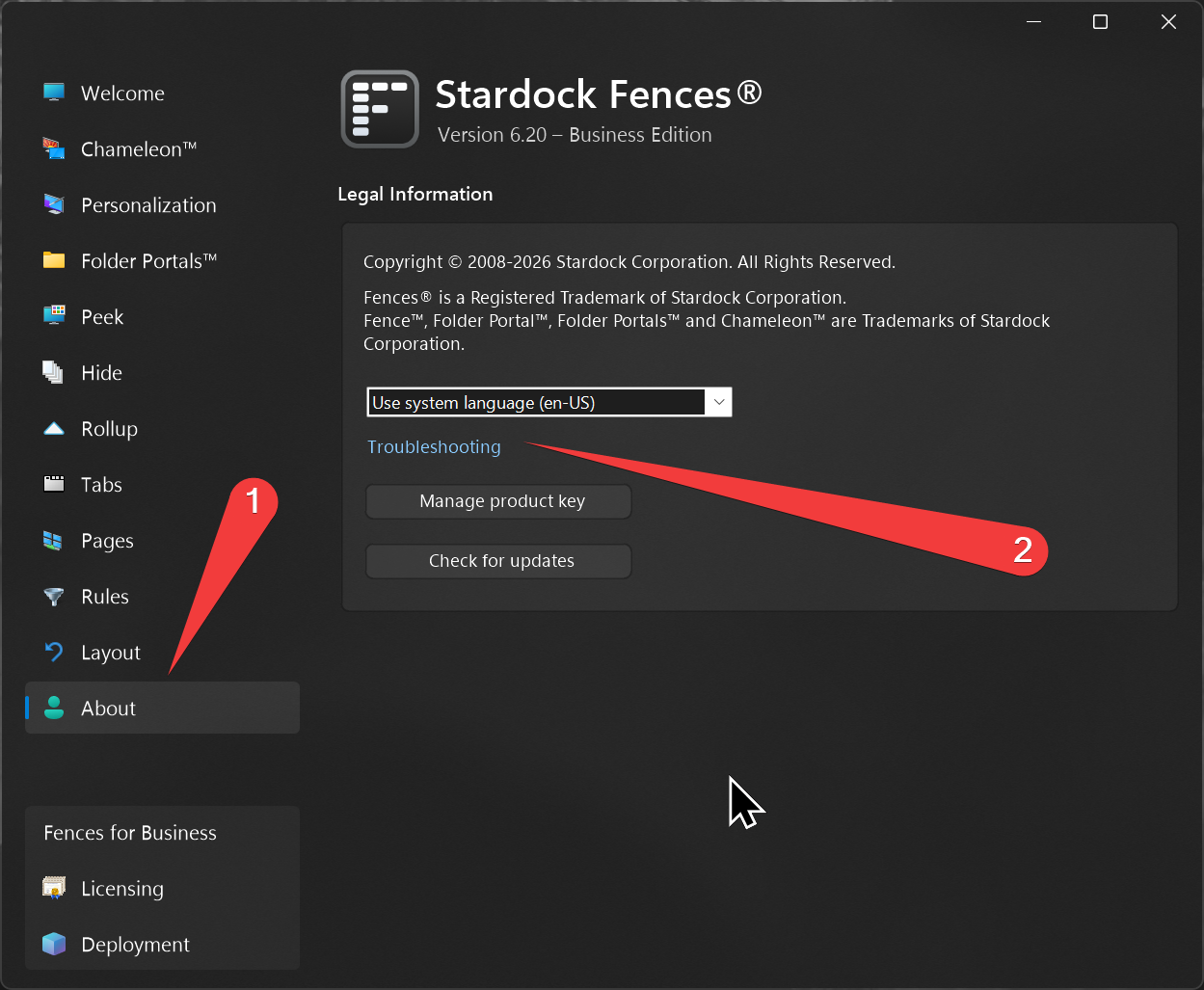
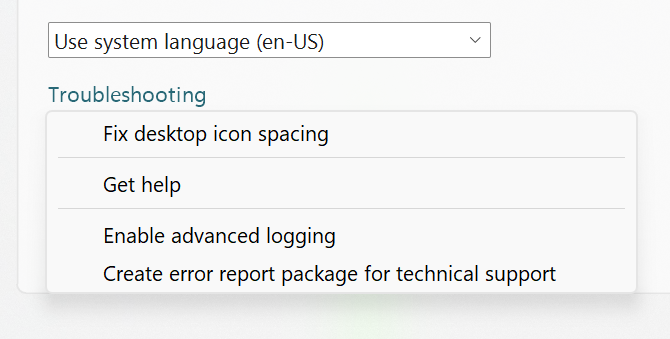
(1) Enable advanced error logging. You can do this by going to "About" -> "Troubleshooting" -> "Enabled advanced logging"

(2) Install 6.45, which has some additional crash dump creation ability:
https://stardock.cachefly.net/software/Fences/Fences6/Archive/Fences6_6.4.5.2-j118-Setup.exe

(3) Reboot

(4) After the next crash, upload us the report by going to "About" -> "Troubleshooting" -> "Create error report package"


Hoping to get this tracked down promptly. Thank you!


+1 Loading…
Reply #48 Top

Quoting Dr, reply 47

For those experiencing this issue, we're hoping you could do the following.

(1) Enable advanced error logging. You can do this by going to "About" -> "Troubleshooting" -> "Enabled advanced logging"

Do I need to install version 6.44 first, or can I install 6.45 directly?

Reply #49 Top

Quoting BigPond, reply 48

Do I need to install version 6.44 first, or can I install 6.45 directly?

Hello,
Install v6.45 directly should be fine.

Thank you,
Basj,
Stardock Community Assistant.

Reply #50 Top

I've just uploaded the crash report with v6.45 with info to team member's Dropbox. Hope this helps :-)

+1 Loading…