Start11 v2 Beta (2.74) Feedback

With the Start11 v2.74 beta release today, we are creating this thread so that users can report any observed issues.  

Obtaining Object Desktop Insider Builds

Object Desktop Manager

Object Desktop members can get beta and Insider builds from within Object Desktop Manager with 'Enable Object Desktop Insider builds' enabled:

image-20240219-210025.png

Stardock Download Page

Or via their download page in the ‘Object Desktop Insider’ section

image-20240219-213743.png

Obtaining Beta Releases

Stardock.com

If a beta was released, Object Desktop Members would see it in the ‘Object Desktop’ section.

Individual purchases would see it on their registration of the product under their download page.

image-20240219-214050.png

Steam

  • Right-click the Product in Steam

  • Properties

  • Betas

  • Select the beta branch at the top right (there is no password)

Example

https://cdn.stardock.us/support/uploads/steamwebhelper_2024-02-19_17-44-35.png

Reporting an issue

Please include the following for anything found:

  • Exact Windows version \ build (winver.exe)

  • Detailed steps to recreate the issue seen

  • Screenshots and videos are very helpful.  Videos can be uploaded to a cloud drive service (GoogleDrive, DropBox, OneDrive, YouTube), with a shared link included in your post.  Images can be copied and pasted directly into a post.

  • If there are specific apps that the app does not work (well) with, please note what apps and their exact versions.  If any app is not common, a link to a trial version would be appreciated.

Thank you for your interest and any time you put into making Start11v2 a better product.

984 views 27 replies
Reply #1 Top

Date

7/10/2026

Version

UI: 2.74
File Version: 2.7.4.0

Changes

  • Fixes an issue with pinning to the taskbar for pinned menus etc on newer versions of Windows

  • Addresses hover-over preview issue with some monitor and taskbar combinations (in version 2.73).

Reply #2 Top

Known issues

While we appreciate all feedback, please remember that we offer no official support for beta \ preview \ developer channel versions of Windows. If you report issues while in any of those early release channels, you should not expect them to be addressed unless it still exists in a retail version of Windows.

  • TBD
Reply #3 Top

***Reserved***

Reply #4 Top

Installed 2.73 on a new Laptop and was hoping 2.74 would fix my problem. Every time I start an app from the shortcut on the taskbar, the moment i minimize it disappears as active (indicator vanishes). Next time I click the icon while the app is still minimized, a new instance is started. Is that a setting somewhere or a bug? Never experienced this before.

Edition    Windows 11 Pro
Version    25H2
Installiert am    ‎05.‎06.‎2026
Betriebssystembuild    26200.8737
Funktionspaket    Windows Feature Experience Pack 1000.26100.334.0

Reply #5 Top
Quoting c242, reply 3995456

Installed 2.73 on a new Laptop and was hoping 2.74 would fix my problem. Every time I start an app from the shortcut on the taskbar, the moment i minimize it disappears as active (indicator vanishes). Next time I click the icon while the app is still minimized, a new instance is started. Is that a setting somewhere or a bug? Never experienced this before.

Edition    Windows 11 Pro

Version    25H2

Installiert am    ‎05.‎06.‎2026

Betriebssystembuild    26200.8737

Funktionspaket    Windows Feature Experience Pack 1000.26100.334.0

End of c242's quote

Hello,

Sorry to hear you are having issues. Is the issue on specific application or any applications such as File explorer? I asked since I test few apps and I don't see the "the moment i minimize it disappears as active (indicator vanishes)" part. Perhaps, I miss understood your meaning on that one. Please elaborate, or perhaps post a video showing your issue.

Thank you,

Basj,

Stardock Community  Assistant.


Reply #6 Top

Its in all apps. Explorer, Directory Opus...

Reply #7 Top
Quoting c242, reply 3995458

Its in all apps. Explorer, Directory Opus...

End of c242's quote


Thanks for your video, but its not very clear, I don't see Windows explorer get minimize. And the one apps get minimize seem closed itself when you minimize it. Obviously once closed, it will open a new one for it when clicked on. Not really sure what application is that. Please post a video on Windows explorer or notepad, and see if the issue appear with these applications. Browser or others have some extension which not really clear if the issue is actually with Start11.

Thank you,

Basj,

Stardock Community  Assistant

+1 Loading…
Reply #8 Top
Quoting basj, reply 3995460
Quoting c242, reply 3995458

Its in all apps. Explorer, Directory Opus...

End of c242's quote


Thanks for your video, but its not very clear, I don't see Windows explorer get minimize. And the one apps get minimize seem closed itself when you minimize it. Obviously once closed, it will open a new one for it when clicked on. Not really sure what application is that. Please post a video on Windows explorer or notepad, and see if the issue appear with these applications. Browser or others have some extension which not really clear if the issue is actually with Start11.

Thank you,

Basj,

Stardock Community  Assistant

End of basj's quote

You are right, I found the problem I activated "Only show minimized apps" in Nexus Dock, which caused the apps to disappear from the taskbar. Problem is, they don`t always appear in the dock. Anyways, I am fine now, thanks for Your help.


Reply #9 Top
Quoting c242, reply 3995465

You are right, I found the problem I activated "Only show minimized apps" in Nexus Dock, which caused the apps to disappear from the taskbar. Problem is, they don`t always appear in the dock. Anyways, I am fine now, thanks for Your help.

End of c242's quote

Great. really glad to hear that.

Thank you,

Basj,

Stardock Community  Assistant

+1 Loading…
Reply #10 Top

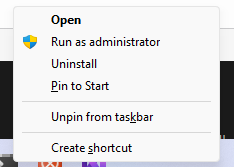
The Shift+Right Click menu doesn't appear for Windows Terminal (Version: 1.24.11911.0) when the Enhanced Taskbar is enabled.

I use this often to run as administrator and here's the menu that should appear:

Edition Windows 11 Pro
Version 25H2
Installed on ‎4/‎12/‎2024
OS build 26200.8894
Experience Windows Feature Experience Pack 1000.26100.334.0


Reply #11 Top
Quoting Snake61AU, reply 3996048

The Shift+Right Click menu doesn't appear for Windows Terminal (Version: 1.24.11911.0) when the Enhanced Taskbar is enabled.

I use this often to run as administrator and here's the menu that should appear:

Edition Windows 11 Pro

Version 25H2

Installed on ‎4/‎12/‎2024

OS build 26200.8894

Experience Windows Feature Experience Pack 1000.26100.334.0

End of Snake61AU's quote

Hello,

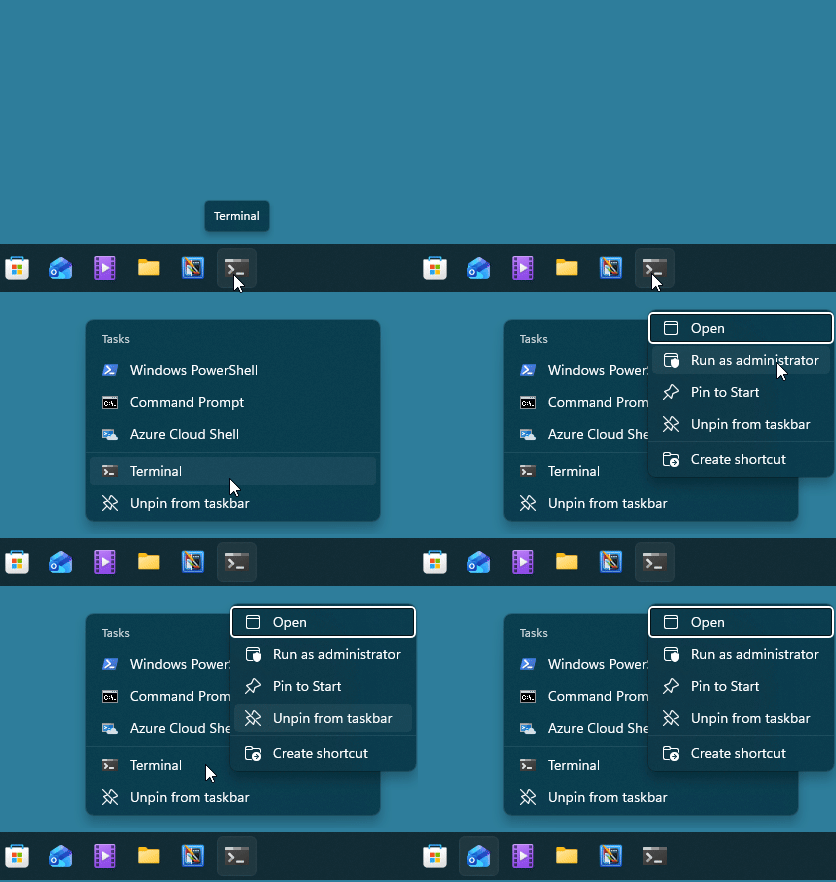
Sorry to hear you are having issues. With Enhance taskbar turned on, you will need to make one extra click. Right click on terminal then right click again on "terminal" item on menu. Refer my short video below.


Thank you,

Basj,

Stardock Community  Assistant.

+1 Loading…
Reply #12 Top

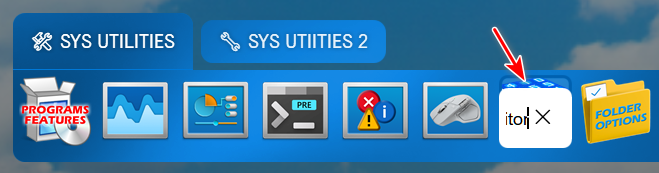
Windows 10 Style, Display 125%

The Rename bubble is very small and does not expand to show the full name. This may be by design, but it makes it hard to use the Rename feature. This appears to be the case with all available styles.

Windows 11 Pro - 26200.8894; Start11v2 - 2.7.4.0

+1 Loading…
Reply #13 Top
Quoting pelaird, reply 3996077

Windows 10 Style, Display 125%

The Rename bubble is very small and does not expand to show the full name. This may be by design, but it makes it hard to use the Rename feature. This appears to be the case with all available styles.

Windows 11 Pro - 26200.8894; Start11v2 - 2.7.4.0

End of pelaird's quote

How do You get those small icons into Your Tabs? Is that Windings or something?

Reply #14 Top
Quoting c242, reply 3996084

How do You get those small icons into Your Tabs? Is that Windings or something?

End of c242's quote

They are emojis. 

Reply #15 Top

Quoting basj, reply 3996049
With Enhance taskbar turned on, you will need to make one extra click. Right click on terminal then right click again on "terminal" item on menu.
End of basj's quote

That solved my issue,

Thank you

Reply #16 Top
Quoting Snake61AU, reply 3996099

That solved my issue,

Thank you

End of Snake61AU's quote

Great, glad it work.

Thank you,

Basj,

Stardock Community  Assistant

Reply #17 Top

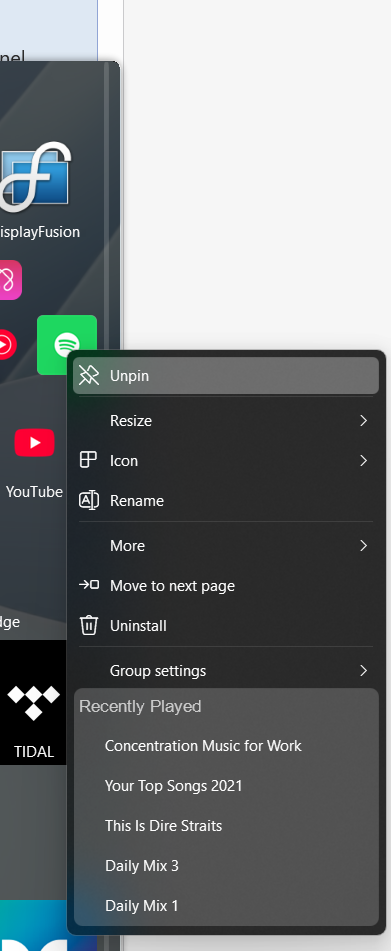
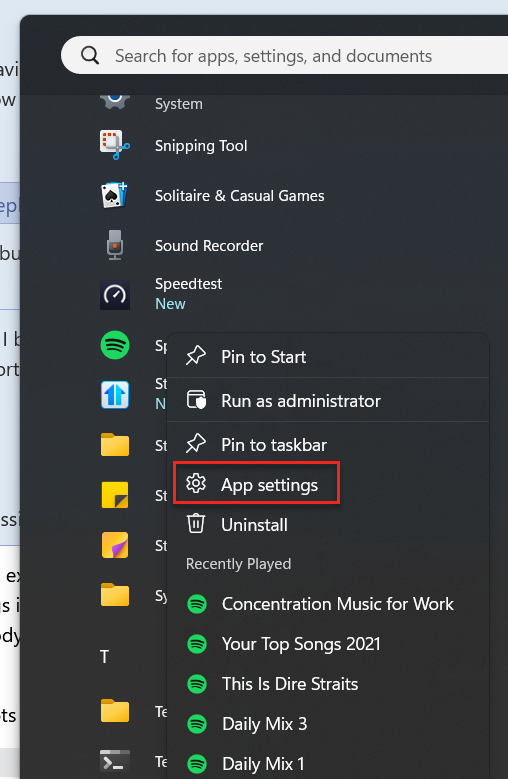
New feature missing? discovered. When you right click on a program on the Windows 11 Start menu there is an option to go to settings (for a Universal APP I think). This is missing in all Start11 Start menus

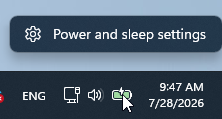
Any news about the bug of not being able to right click on the battery for power settings with an increased in height taskbar?


Reply #18 Top
Quoting Nikosyan, reply 3996112

New feature missing? discovered. When you right click on a program on the Windows 11 Start menu there is an option to go to settings (for a Universal APP I think). This is missing in all Start11 Start menus

End of Nikosyan's quote

Hello,

Sorry to hear you are having issues. But, I checked, I can't reproduce what you see on default Windows Start panel. Please post a screenshow or a video showing what you see on your system showing setting as an option.

Quoting Nikosyan, reply 3996112

Any news about the bug of not being able to right click on the battery for power settings with an increased in height taskbar?

End of Nikosyan's quote

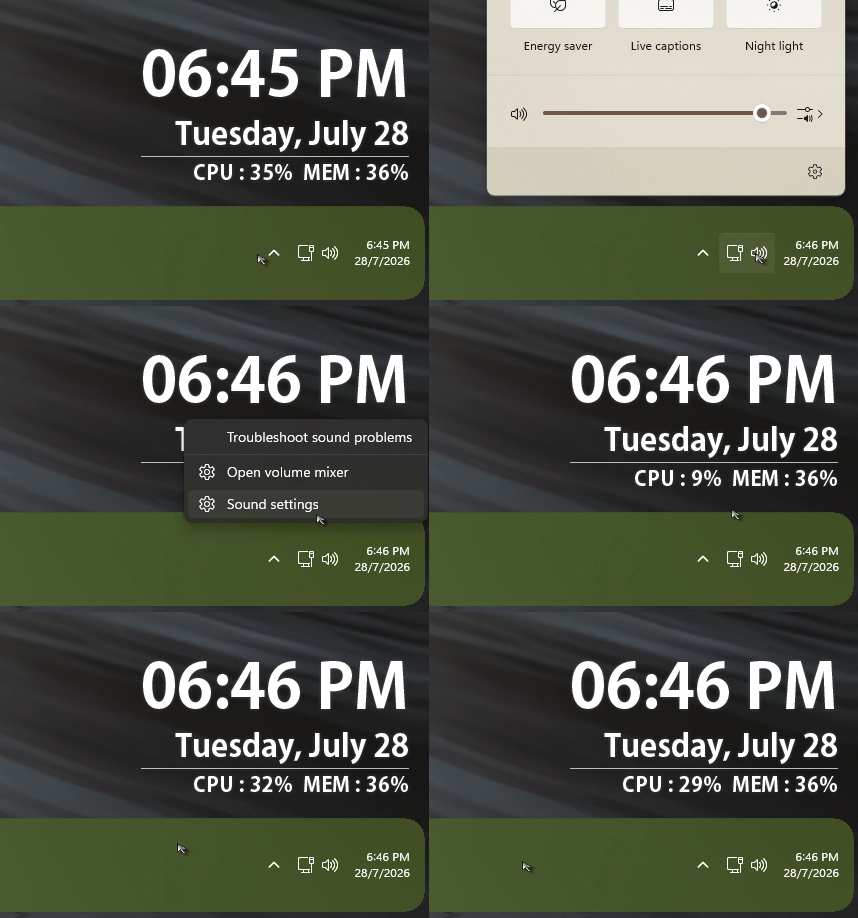
If I remember correctly, I believe this was resolved on V2.73, I don't have battery on my system, but this what I see on volume. Refer to my short video below. Do let us know if you was referring to something else.

Thank you,

Basj,

Stardock Community  Assistant.

Reply #19 Top
Quoting basj, reply 3996114
Quoting Nikosyan, reply 3996112

New feature missing? discovered. When you right click on a program on the Windows 11 Start menu there is an option to go to settings (for a Universal APP I think). This is missing in all Start11 Start menus

End of Nikosyan's quote

Hello,

Sorry to hear you are having issues. But, I checked, I can't reproduce what you see on default Windows Start panel. Please post a screenshow or a video showing what you see on your system showing setting as an option.


Quoting Nikosyan, reply 3996112

Any news about the bug of not being able to right click on the battery for power settings with an increased in height taskbar?

End of Nikosyan's quote

If I remember correctly, I believe this was resolved on V2.73, I don't have battery on my system, but this what I see on volume. Refer to my short video below. Do let us know if you was referring to something else.

Thank you,

Basj,

Stardock Community  Assistant.

End of basj's quote

Yes, the video you post is exactly that, power and sleep settings still cannot be clicked if the taskbar is resized is 3 lines higher, the Sound settings is good up to a reasonable amount of dragging up the taskbar 5 lines, at some point is not clickable either, but nobody would pull the taskbar up more than 6-7 lines. But the battery issue is still there, I am on 2.74 now. 

I will post later screenshots of the right click on settings 

Reply #20 Top
Quoting basj, reply 3996114
Quoting Nikosyan, reply 3996112

New feature missing? discovered. When you right click on a program on the Windows 11 Start menu there is an option to go to settings (for a Universal APP I think). This is missing in all Start11 Start menus

End of Nikosyan's quote

Hello,

Sorry to hear you are having issues. But, I checked, I can't reproduce what you see on default Windows Start panel. Please post a screenshow or a video showing what you see on your system showing setting as an option.


Quoting Nikosyan, reply 3996112

Any news about the bug of not being able to right click on the battery for power settings with an increased in height taskbar?

End of Nikosyan's quote

If I remember correctly, I believe this was resolved on V2.73, I don't have battery on my system, but this what I see on volume. Refer to my short video below. Do let us know if you was referring to something else.

Thank you,

Basj,

Stardock Community  Assistant.

End of basj's quote

Win10 Start11  Startmenu (but same right click list regardless of menu style) 

vs Win 11 standard:

Reply #21 Top
Quoting Nikosyan, reply 3996115

Yes, the video you post is exactly that, power and sleep settings still cannot be clicked if the taskbar is resized is 3 lines

End of Nikosyan's quote

Actually, the "Sound Setting" did opened up on the system, I purposely make it small frame, not show in the video to cut down the size of the video file.

Thank you,

Basj,

Stardock Community  Assistant

Reply #22 Top
Quoting basj, reply 3996117
Quoting Nikosyan, reply 3996115

Yes, the video you post is exactly that, power and sleep settings still cannot be clicked if the taskbar is resized is 3 lines

End of Nikosyan's quote

Actually, the "Sound Setting" did opened up on the system, I purposely make it small frame, not show in the video to cut down the size of the video file.

Thank you,

Basj,

Stardock Community  Assistant

End of basj's quote

Sorry I was not very clear, yes the sound settings worked up to a point, battery still not at all

Reply #23 Top
Quoting Nikosyan, reply 3996116
Quoting basj, reply 3996114
Quoting Nikosyan, reply 3996112

New feature missing? discovered. When you right click on a program on the Windows 11 Start menu there is an option to go to settings (for a Universal APP I think). This is missing in all Start11 Start menus

End of Nikosyan's quote

Hello,

Sorry to hear you are having issues. But, I checked, I can't reproduce what you see on default Windows Start panel. Please post a screenshow or a video showing what you see on your system showing setting as an option.


Quoting Nikosyan, reply 3996112

Any news about the bug of not being able to right click on the battery for power settings with an increased in height taskbar?

End of Nikosyan's quote

If I remember correctly, I believe this was resolved on V2.73, I don't have battery on my system, but this what I see on volume. Refer to my short video below. Do let us know if you was referring to something else.

Thank you,

Basj,

Stardock Community  Assistant.

End of basj's quote

Win10 Start11  Startmenu (but same right click list regardless of menu style) 

vs Win 11 standard:

End of Nikosyan's quote


Quoting Nikosyan, reply 3996118

Sorry I was not very clear, yes the sound settings worked up to a point, battery still not at all

End of Nikosyan's quote

Hello,

I have forwarded your problem/question to Stardock Support Team for their assistance. Please keep an eye on this thread for any updates. We appreciate your feedback and patience. Thank you.

Basj,

Stardock Community  Assistant

Reply #24 Top

Basj, can you look at reply 12 and let me know if you also experience this issue.

Reply #25 Top

Hi Nikosyan,

Thank you for your posts.

Quoting Nikosyan, reply 3996116
Quoting basj, reply 3996114
Quoting Nikosyan, reply 3996112

New feature missing? discovered. When you right click on a program on the Windows 11 Start menu there is an option to go to settings (for a Universal APP I think). This is missing in all Start11 Start menus

End of Nikosyan's quote

Hello,

Sorry to hear you are having issues. But, I checked, I can't reproduce what you see on default Windows Start panel. Please post a screenshow or a video showing what you see on your system showing setting as an option.

Quoting Nikosyan, reply 3996112

Any news about the bug of not being able to right click on the battery for power settings with an increased in height taskbar?

End of Nikosyan's quote

If I remember correctly, I believe this was resolved on V2.73, I don't have battery on my system, but this what I see on volume. Refer to my short video below. Do let us know if you was referring to something else.

Thank you,

Basj,

Stardock Community  Assistant.

End of basj's quote

Win10 Start11  Startmenu (but same right click list regardless of menu style) 

vs Win 11 standard:

End of Nikosyan's quote

I've reproduced the missing 'App Settings' option on the context menu and we'll have this logged.

  • Internal Ref: ODNT-12510

As for the battery menu, I'm not sure what you are expecting to see, and how Start11v2 may be impacting it.  I see this option when I right click my battery icon:

You might try seeing if the behavior is different for this without Start11v2.  If possible, you could try it on a Sandbox to test this.  If you have further questions to look into it further, we'll be happy to look at a new post.

Best regards,

Adam McGuinness
Stardock Support Specialist