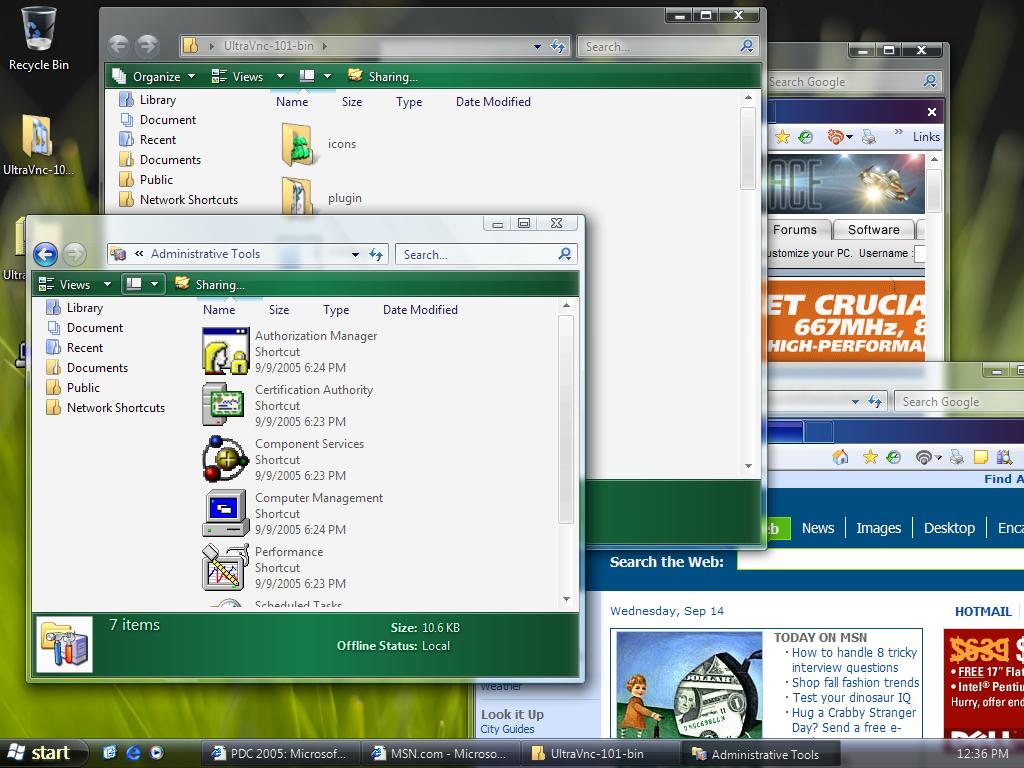
PDC 2005: More Windows Vista screenshots

Here's some shots from PDC of Vista that I took...

Vista looks good but they still haven't gotten rid of the ugly icons in some places.  PLEASE change the icons throughout the system. 

An alternative way of doing Alt-Tab. It looks good but I didn't find it that practical.  The primary Alt-Tab method is fancier than the Windows XP alt-tab but noticeably slower.  I like slick but I don't want it to noticeably slow me down and I do a lot with Alt-Tab.

The sidebar and task preview (something we are working on for WindowFX too).  The sidebar now is merely a container for gadgets which is absolutely sweet in theory.  I like the concept a lot.  However, right now, the gadgets are apparently implemented in DHTML.  I relaly don't see that as a practical thing.  I'd like to see them switch to have gadgets be Avalon based with the noborders switch on.  I think gadgets would be a great way for Microsoft to get people to start using XAML. Note: This is not necessarily what the Sidebar is going to look like in the final version. This was a beta version that was shown at PDC.

Gadgets can be pealed off and live on the desktop as well.

New file save dialog. I like the design but if you look closely, Windows classic can still peer through so there's still some fit and finish to be done there.

And for fun, here's a screenshot of my Windows XP desktop running Object Desktop with the WindowBlinds 5 beta (public beta in a week or two):

WindowBlinds 5 on XP can do semi-transparent borders and Start bars and runs fast on fairly low end hardware.  On Windows Vista, WindowBlinds 5 will make use of the new Windows Vista compositer to allow for much more advanced skinning than we've seen previously.  Much of the next-gen skinning will be back ported to Windows XP (though users with install the Avalon libraries on XP will likely benefit). 

Overall, Vista's a really good experience.  But I do hope there's an overall fit and finish guy over there so that things like ancient icons and inconsistent fonts get fixed.  Some of these icons have managed to survive since Windows NT 3.1 (1994).

63,783 views 26 replies
Reply #1 Top
They still haven't shown me anything that isn't already OUT there already...

Then again I also haven't gotten a chance to play with it yet...So I guess I will have to just hold on my judgement.
Reply #2 Top
I bet that alternative alt-tab will be cursed by the same problem that the current 'task switcher powertoy' is - that many apps (such as winamp) have multiple primary windows, only some of which are intended to be seen. With winamp, for example, when using the alt-tab with 'task switcher powertoy', you see that the Classic skinned interface is *still present* and is just hidden by the modern skin. There are several other apps that don't like screenshots being taken of themselves, as I'm sure you're aware of from when ObjectDock added app thumbnails.

It would be nice if everyone would update those apps for proper vista compatibility, but in the real world, many never do get updated.
Reply #3 Top
But I do hope there's an overall fit and finish guy over there so that things like ancient icons and inconsistent fonts get fixed.


The mouse cursor should also be revamped to fit-in with the new interface.
Reply #5 Top
There are rumored to be as many as seven (ridiculous) versions...so price is going to be just as confusing.
Reply #6 Top
Good lord they are using the same damn icons..... What a bunch of idiots
Reply #7 Top
Awesome! Thanks for the continued coverage of Vista...you're a lucky dude. I got to beta test Win95 prior to release and it was a blast seeing what each new build would bring and what MS was experimenting with. Must be fun
Reply #8 Top
It most likely will get changed by beta 2. Also, the true Aero interface will be implemented.

Oh, and 9Iron, thay aren't idiots. This is a beta, and one aimed at developers, at that.
Reply #9 Top
+ thanks for shot on interaction of Stardocks windowfx with that, promising again. How much faster I go vista than the majority of my crucial apps. force me to anyway in the long run might also depend on whether they change usage terms. Lately when installing updates u agreed to not being allowed to old version even after having paid for both of em, at least with some programs of theirs it was like that. German law says u can get money back because of not having been able to see terms before buying unless they put that on the box, too. But in MS terms I could still not reinstall old version, + after installing new 1 instead of getting back, u accept terms and cant backdate. Good u told us that at least in the meantime a lot is backported. They making it hard on themselves? Im probably overlooking some other reason of theirs...., should ask them why myself 1 day.
Reply #10 Top
Well, that certainly is good to know HighCommand
Reply #11 Top
Perhaps the reason why some of the icons never changed is because most users never see them in the first place. If the users only use the basic functionality of Windows, the likelihood of seeing ancient icons from the old days is very very slim, maybe nil if we're lucky. I'm sure a bunch of us power-users are those who poke around, traverse, uncover, and tinker with various internal settings to better suit our needs. But this is all in theory.

The alt-tab looks kinda weird... I do not like having the windows tilted or turned in some degree to determine what window is what. I doubt alt-tabbing can ever be truly replaced unless they go with something similar to Mac OS X's own Expos.

What they can do is drop all seen windows into transparent mode (say, 50%), and have each hilighted (but not selected) window come up to 75% transparency. If the hilighted window happens to be minimized, perhaps only show the program icon. But that's just an idea... so who knows.
Reply #12 Top
Question.

I have Vista Beta one installed on ym computer but I havent seen any implementation of the task preview or the new alt tab...any one have any ideas to as why? Thanks in advance.
Reply #13 Top
I have Vista Beta one installed on ym computer but I havent seen any implementation of the task preview or the new alt tab...any one have any ideas to as why? Thanks in advance.


That's because this is a new PDC build... not beta one. I think.
Reply #14 Top
I dont know, I kinda like the "alt-tab" view.
Thanks for the heads up!
Reply #15 Top
Also like alt tab powertoy + wonder whether Vista will support old powertoys. Highlighting/transparency etc I solve applying ActWinMan 3.7 by actualtools.com + Tweak window 1.5(not tweak windows) by absolute way.com. Some wont want these tools TSR which they dont always have to be or paying for those either, I am sure they will be updated to vista at least in parallel alternative versions. The rest of what these tools dont do I add on by using macro program KeyText reg. vers on THEM, another thing normal users wont all want.

In a way MAC OS in itself seems like an alternative the majority may not want, shame that fact leads to apples hardware seeming overpriced in some aspects, which brings up another naive ?, will there be a day when I can recommend most of stardocks tools to the MAC users who want them at all, or which ones work/dont work already for THEM?
Reply #17 Top
does anyone know where i can get that backgroud/wallpaper in the screenshots? (ie. the grass looking one in the pics)

pls pls pls pls ????
Reply #18 Top
all i wanna know is if it has x64 support...
Reply #19 Top
I think it will, or there will be an x64 version of it.
Reply #20 Top
Considering there is already a x64 version of XP, of course there will be an x64 version of Vista. But, I understand that x32 and x64 will remain separate versions. There are still plenty of x32 only processors still being sold even today, so they can't drop x32 support anytime soon. But, since the x32 and x64 versions are being developed in parallel, they should have the exact same feature set and essentially identical stability. But, the x64 version will have heafty RAM requirements, as 64 bit mode simply requires more memory since what used to take 32 bits will now usually take 64.
Reply #21 Top
I have a question. Does taskbar grouping still exists in Vista? If yes, does it has the taskbar preview too? Screenshot would be appreciated
Reply #22 Top
I got the wallpaper off a site but I can't recall where from. Just do a search for Vista Wallpaper and you should find it I think. Otherwise I guess you could click on my profile and meail me for it. I think I only have the 1280x1024 size though.

I like the alt+tab implementation at least in theory. The current one is good and I use it a lot, but occaisionally it is tough if there is more than one window of a program, then I have to read the caption. The powertoy was better, but too slow. I assume the new graphic capabilities will help Vista's be smoother.
Reply #23 Top
Considering there is already a x64 version of XP, of course there will be an x64 version of Vista. But, I understand that x32 and x64 will remain separate versions


I hope users get NO CHOICE in which version installs. Why? I have an x64 - I *want* to run x64 version, no reason I shouldn't.

However, if they give ANY EXCUSE WHATSOEVER to the IHV's such as Canon to claim that 64 bit is 'not consumer', like they are right now, we won't see very much driver support at all.

I've already had to back off from using x64 because my printer and my PDA are completely unsupported in x64. No drivers at all. If Vista doesn't force x64 installs on x64 hardware, IHV's will continue to have an excuse not to upgrade drivers.

MS needs to take the lead here, and IHV's who can't bother to recode for 64 bit need to go out of business.
Reply #24 Top
I really like the refined look of Windows Vista but it reminds me a bit of Mac OSX Tiger with "Desktop Gadgets" which looks like the Widgets on Mac and "Search Bar" (which looks oddly similar to Mac's spot light). I think MS should use this oppertunity to regain the lead on Mac who have come out with some really innovative stuff (ie. OSX Pather & Tiger, G5 processors, iPod, etc.). I'm a die-hard MS fan, however it's been more and more difficult to stay loyal when Mac keeps on pumping out better software/OS's.

Also does anyone know if the windows on Vista will always be translucent or will there be a opaque one as well (or at the very least give us the option to change the transparency)? Please reply regarding this matter, Thank you.
Reply #25 Top
I think from what i have heard that vista will only support 64 bit systems.